Awdflash.exe is a utility program that helps you to update your BIOS - the code that runs the first moment you boot your PC. It was created by Award Software Inc. to support flashing Award BIOS based data files.
The BIOS code is stored on the motherboards on Flash chips since its introduction in 1993.
Award Software Inc. started working on the Award Flasher in 1993. The first versions only supported the Intel 28F010 flash chips. During that time almost no motherboards featured flashable BIOS chips. In 1994/1995, with the availability of Awdflash 5.x, the core BIOS release of Award BIOS Elite v4.50PG and flash chips on motherboards, the tool became a lot more used.
All these Award Flasher (awdflash) versions are DOS based and can't be run from Windows or other operating systems. The command prompt in Windows will not be sufficient.
Award also released Windows based flashers called Award Winflash. You can find these below.
Please read our How to flash your bios FAQ to correctly use the awdflash or winflash executables.
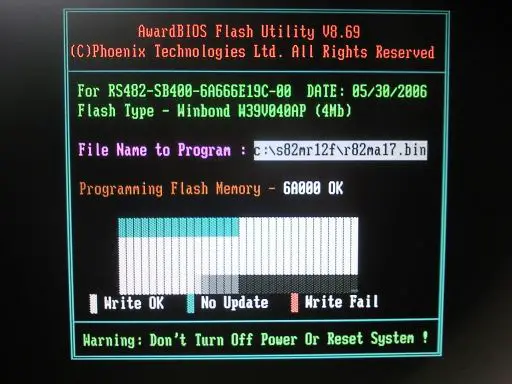
Awdflash - DOS based Award BIOS flasher
Winflash.exe - Award Flasher (Windows 32/64bit based)
Award Winflash.exe allows you to flash your BIOS from within Windows (NT/2000 or later). From Winflash v1.90 on, 64-bit versions of Windows are supported.
Please note that Windows Vista/Windows 7/Windows 8 32 bit or 64 bit or later is not supported by any of the Award Winflash.exe versions below. You'll need to use WindowsXP 32bit or 64bit or follow our DOS based BIOS update guide.
When you launch Winflash you'll see the user interface as below. You can choose the following options:
- Update the BootBlock
- Update the PnP area
- Update the DMI area
- Clear the CMOS
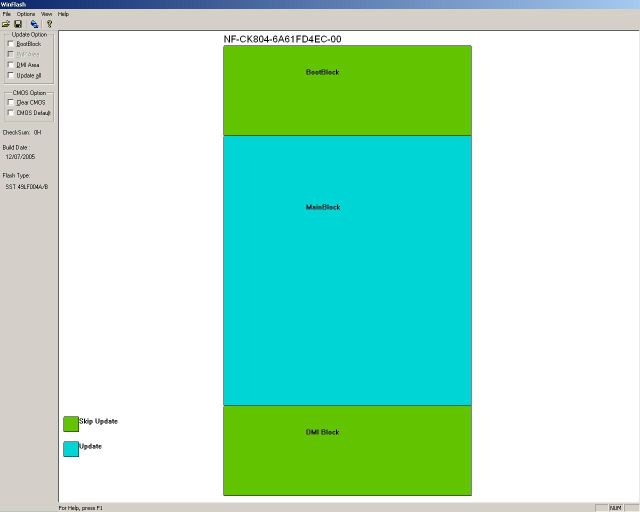
To update your BIOS with WinFlash:
- Select File -> Open. If your current BIOS version doesn't support WinFlash, it will give a warning. Do not continue in that case and use awdflash in DOS
- Choose the correct BIOS data file
- Select File -> Update BIOS
- Choose Yes on "Do you want to load again"
- Click on the Update button to start the update
- When the flashing procedure completes, Winflash will ask you to reboot your PC: Select YES
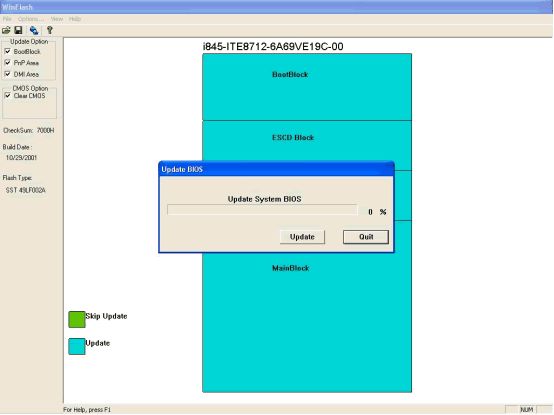
Download Award WinFlash
| Winflash version | Notes |
|---|---|
| Award Winflash 1.76 | Only 32-bit supported |
| Award Winflash 1.90 | 32/64 bit supported |
| Award Winflash 1.94 | 32/64 bit supported |
The Flasher utilities are copyrighted by their respective owners. Thanks to apple_rom and Zerioze for history information.
<%@ include file="/includes/googlesearch.jsp" %>