<%@ include file="/ad/googleresponsive.jsp" %>
<%@ include file="/includes/subscribeemaillist-sendy.jsp" %>
<%@ include file="/includes/fastsecurestable-webhosting.jsp" %>
<%@ include file="/ad/googlebigrectangle.jsp" %>
- Download the Hiren Generic USB Format tool
- Download the Win98SE_bootdisk.iso at All Boot disks
- Unzip the iso file (eg. with 7Zip)
- Start the USB format tool. Choose the following options:
- Device: USB Stick you want to use (keep in mind that it'll be formatted and you'll lose any data on it)
- File system: FAT or FAT32
- Check "Create a DOS Bootable Disk" using DOS system files located at the directory where you have unzipped the ISO
- Click on Start
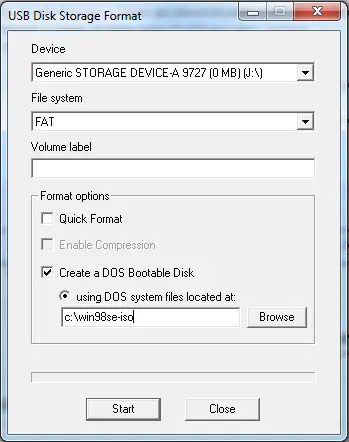
Your boot disk has now been created. Now you just need to copy the flasher and the BIOS data file on it. Reboot your PC and change the Boot Sequence in the BIOS to boot from the USB Memory stick
Check How to flash your BIOS to proceed with flashing your BIOS.
Also check out how to make a bootable CD-ROM
Go back to our BIOS FAQ.
<%@ include file="/includes/googlesearch.jsp" %>