<%@ include file="/ad/googleresponsive.jsp" %>
<%@ include file="/includes/subscribeemaillist-sendy.jsp" %>
<%@ include file="/includes/fastsecurestable-webhosting.jsp" %>
<%@ include file="/ad/googlebigrectangle.jsp" %>
We have three different kind of Phoenix BIOS Flashers available on Wim's BIOS.
- phlash is a DOS based flasher.
- Winphlash lets you update your BIOS from within Windows (32 bit and 64 bit versions).
- If you have an UEFI based BIOS from Phoenix you'll need to use Phoenix UEFI Flasher
phlash.exe - Phoenix Flasher (DOS based)
The below Phoenix BIOS flashers work under DOS only.
phlash.exe - Phoenix Flasher (DOS based)
Winphlash.exe - Phoenix Flasher (Windows 32/64bit based)
The Phoenix WinPhlash utility is a 32-bit/64 bit application which runs in a Windows environment to update, backup, and restore the system BIOS on a flash device.
This utility can use an optional settings file called PHLASH.INI
The below Phoenix BIOS flashers work under Windows 32 and 64 bit versions.
Phoenix Winphlash allows you to flash your BIOS from within Windows (NT/2000 or later - 32 bit editions). Winphlash64 supports 64-bit versions of Windows.
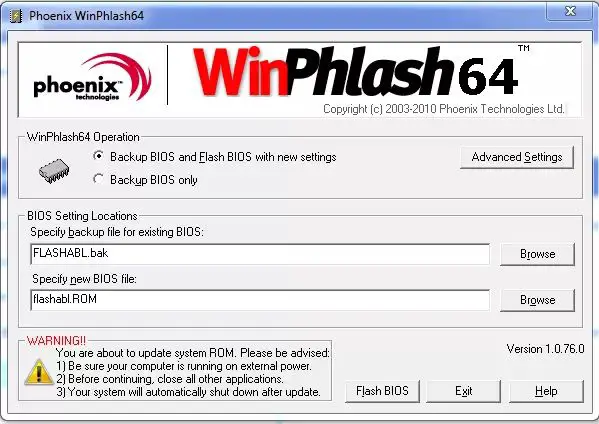
Please read the Phoenix Winphlash userguide first.
Download Phoenix BIOS Winphlash
| Winphlash version | Notes |
|---|---|
| Winphlash v1.5.0.55 | Only 32-bit supported |
| Winphlash v1.6.1.1 | Only 32-bit supported |
| Winphlash v1.6.8.4i1 | Only 32-bit supported |
| Winphlash v1.6.8.4i1 | Only 32-bit supported |
| Winphlash v1.6.9.7 | Only 32-bit supported |
| Winphlash v1.7.16.0 | Only 32-bit supported |
| Winphlash v1.7.24 | Only 32-bit supported |
| Winphlash v1.7.27 | Only 32-bit supported |
| Winphlash v1.7.35 | Only 32-bit supported |
| Winphlash v1.7.37 | Only 32-bit supported |
| Winphlash64 v1.0.3.5 | 64 bit supported |
| Winphlash64 v1.0.49 | 64 bit supported |
| Winphlash64 v1.0.56 | 64 bit supported |
| Winphlash64 v1.0.76 | 64 bit supported |
| Secure Winfhlash v2.0.3.4 | 32 bit supported |
Phoenix UEFI Winflash (Windows 32/64bit based)
Phoenix UEFI Winflash lets you flash UEFI based BIOS updates for your computer system.
Download Phoenix UEFI BIOS Winphlash
| Phoenix UEFI Flasher version | Notes |
|---|---|
| Phoenix UEFI Winflash v1.4.75.0-0.3 | |
| Phoenix UEFI Winflash v1.4.83 | |
| Phoenix UEFI Winflash v1.5.66 |